Why you need it
Shadowrocket isn’t in the China App Store. To download it you need an Apple ID set to the US (or another region) and buy it in that region’s App Store.
1. Create the new Apple ID
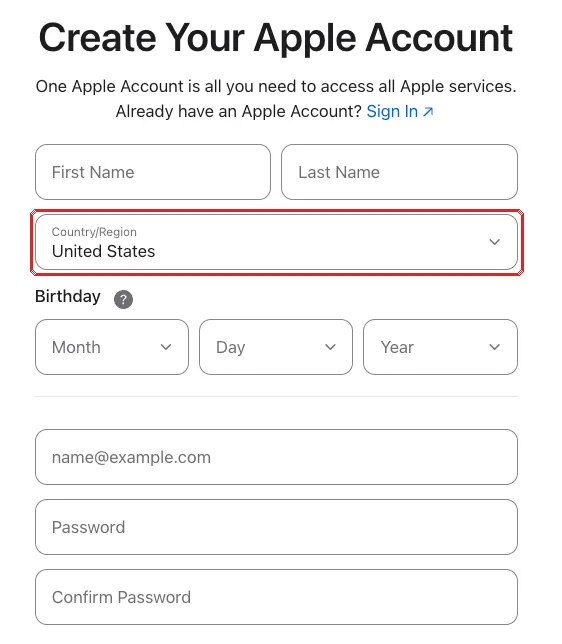
- Open account.apple.com in a browser and choose to create an Apple Account.
- Set “Country or Region” to United States (or the region you need).
- Use an email that has never been an Apple ID, such as your new Gmail.
- You can use your own phone number (+86) for verification codes.
- Verify the email and phone number as prompted.
2. Get a payment method
Shadowrocket is paid (a one-off purchase of about US$3 on the US store). The payment method must match the account’s region:
- a bank card from that region, if you have one;
- otherwise, top up the account balance with an App Store gift card for that region, bought from Apple or an authorized seller.
3. Switch the App Store account on iPhone
- Open Settings and tap your name at the top.
- Go to “Media & Purchases” and choose “Sign Out”. This only signs out of the App Store, not iCloud.
- Open the App Store, tap your avatar at the top right and sign in with the new Apple ID.
- Search for Shadowrocket, check the developer is Shadow Launch Technology Limited, and buy it.
You can switch back to your usual account afterwards. Updating Shadowrocket later may ask for the non-China Apple ID’s password.
Stuck?
It says this email is already an Apple ID?
One email, one Apple ID — use a different email.
Shadowrocket doesn't show up in the App Store?
Make sure the App Store shows the non-China account, switched under Media & Purchases — not in iCloud.
Can I borrow someone's non-China Apple ID?
Not recommended. The owner can change its password or lock it — and if signed in to iCloud by mistake, it could even be used to lock your device.