How
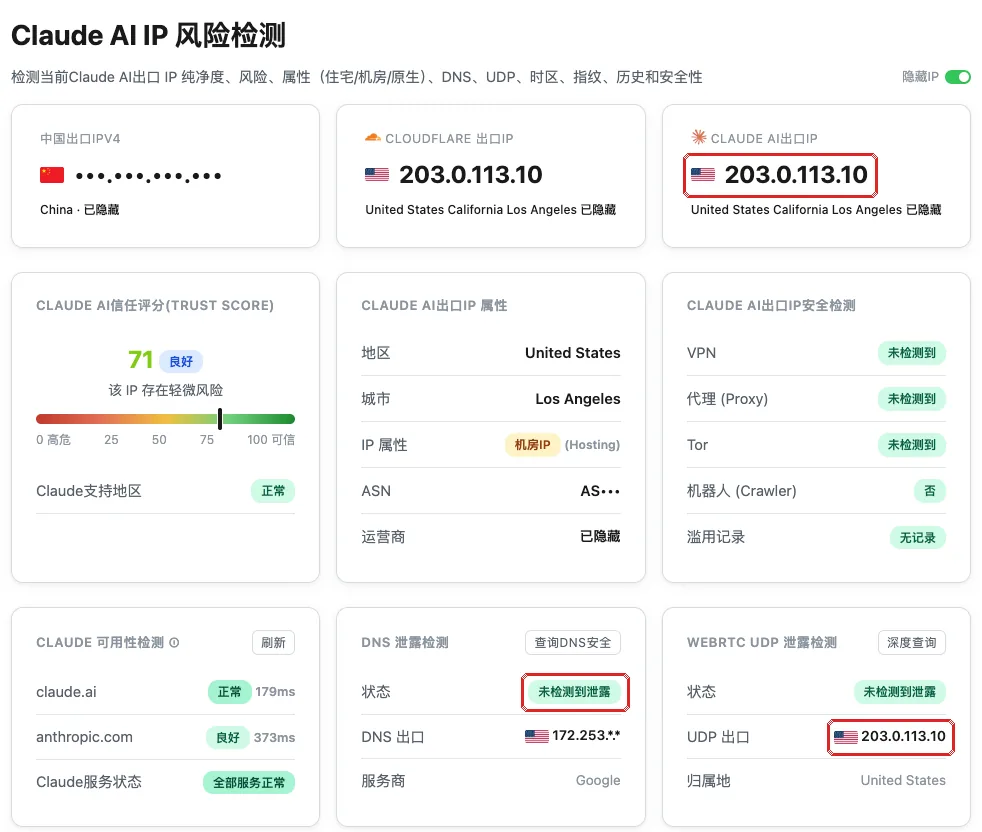
On a device with the app connected, open ip.net.coffee/claude/ in the browser.
| Item on the page | Meaning | It should be |
|---|---|---|
| Claude AI exit IP | The IP Claude sees for you | Your server’s IP |
| Region, city | Where that IP is | The server’s location |
| IP type | Residential, data center or native | Your own server usually shows data center — normal |
| Trust score | Claude’s rating of the IP | Higher is better; a data-center IP won’t be perfect |
| DNS leak test | Where your DNS lookups exit | Not in China |
| WebRTC UDP leak test | The IP the browser’s WebRTC reports | Your server’s IP (computers only) |
If it looks wrong
- The exit IP is your home IP: traffic isn’t going through the proxy — check the app is connected with the profile selected.
- The exit IP is some other foreign IP: another proxy or VPN may be running, or your home router has one.
- DNS or WebRTC in China: see Check for DNS leaks and Check for WebRTC leaks.