What this step is
Rent a server from a provider. When you’re done you’ll have three things: the server IP, the root password and the SSH port. The next steps use them to log in.
Which provider
We recommend BandwagonHost (搬瓦工). Its routes are stable, the author uses it, and this setup has been tested on it again and again.
DMIT is good too, but often out of stock — don’t wait for it.
Which options to choose
Provider pages show lots of options; only these matter:
| Option | Choose | Why |
|---|---|---|
| Operating system | Ubuntu 24.04 | Only Ubuntu 22.04+ and Debian 12+ are supported. Wrong choice? Reinstall from the dashboard |
| Location | Los Angeles, US | Relatively close to China; all major AI services support the US |
| Memory | 1 GB is enough | Nodes and the AI API run well on 1 GB in testing |
| Virtualization | KVM | A full system. BandwagonHost uses it by default |
| IP | A dedicated public IP (IPv4) | Not a NAT machine — those only get a few ports, and the certificate and nodes won’t install |
| Traffic | A few hundred GB to 1 TB per month | Plenty for you and your family |
Ordering
- Click the link above and choose a plan and billing cycle (quarterly or yearly).
- Choose Los Angeles and Ubuntu 24.04 (some providers let you pick the OS after the server is ready).
- Sign up with your email and pay as the checkout page allows. BandwagonHost accepts Alipay (支付宝).
- Within minutes to tens of minutes you’ll get a “server ready” email, and the server appears in your service list.
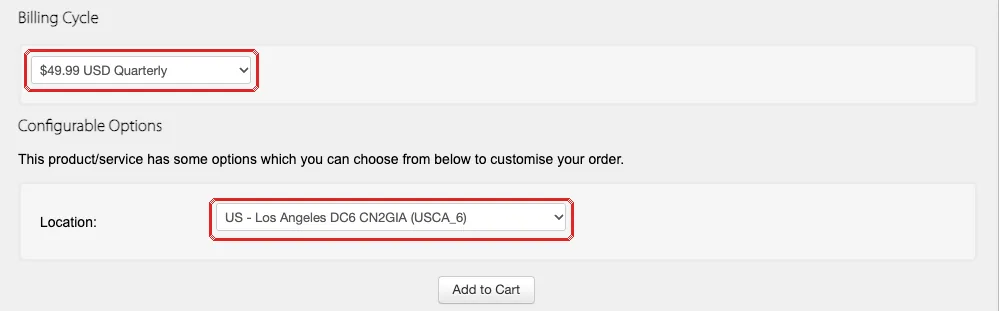
More detail in the how-tos: Buy from BandwagonHost, Buy from DMIT. Picked the wrong OS? See Reinstall the OS as Ubuntu.
Write down three things
Find these in the email or the provider’s dashboard and keep them somewhere only you can see:
| Note | Looks like | Notes |
|---|---|---|
| Server IP | Four groups of numbers, e.g. 203.0.113.10 |
The server’s address |
| root password | A string of letters and numbers | The admin password. Some providers give a key file instead — note where it is |
| SSH port | Usually 22, sometimes another number |
The “room number” for remote login |
Stuck?
Payment failed. What now?
Try another payment method offered at checkout. Still failing? Open a ticket with the provider, or try another provider.
Paid, but no “server ready” email?
Check spam first. Then log in to the provider and look for “My Services” — the IP and login details are usually there too. New accounts are sometimes reviewed manually; wait a little or open a ticket.
Wrong OS, or not sure which I picked?
Find “Reinstall OS” in the provider’s dashboard and choose Ubuntu 24.04. Reinstalling wipes the server — nothing to lose on a new machine. Use the new root password afterwards.
My SSH port isn't 22. Does it matter?
No. Note it down and tell the AI (or put it in the command) in the next steps.
Before moving on, check
✓ All ticked — on to the next step.